Is ROB RUN on Console, Steam Deck, or Controller?
ROB RUN runs on 64-bit Windows 10 via Steam in Early Access, with Easy Anti-Cheat, keyboard and mouse controls, PC requirements, and supported languages.

ROB RUN is available only on 64-bit Windows through Steam, where Kefir launched it as a free-to-play Early Access release on 2026-11-04. No console edition for PS5 or Xbox, no mobile app, and no Mac or Linux client appear in the store metadata, and the exported English client strings contain no controller or gamepad settings. If you are installing on a Windows computer, head to our complete beginner’s guide once you are in game.
Platform Availability and Steam Distribution
Store metadata records Windows as the sole platform and marks the title as free to play. Kefir distributes and authenticates the client through Steam, and support error guidance tells players to launch the game exclusively via Steam while signed into an online account.
No console, mobile, Mac, or Linux release appears in the store overview or in Kefir’s update channels, so any installer or APK hosted outside Steam is outside Kefir’s distribution. Downloading on Steam costs nothing, and Kefir’s monetization FAQ notes that B-Coins pay for cosmetic items alone without changing stats, balance, or progression.
Steam Deck, Linux, and Easy Anti-Cheat
Neither the Steam store overview nor support articles from Kefir list Linux or portable handheld compatibility, and the hardware baseline specifies 64-bit Windows 10 or newer with DirectX 11.
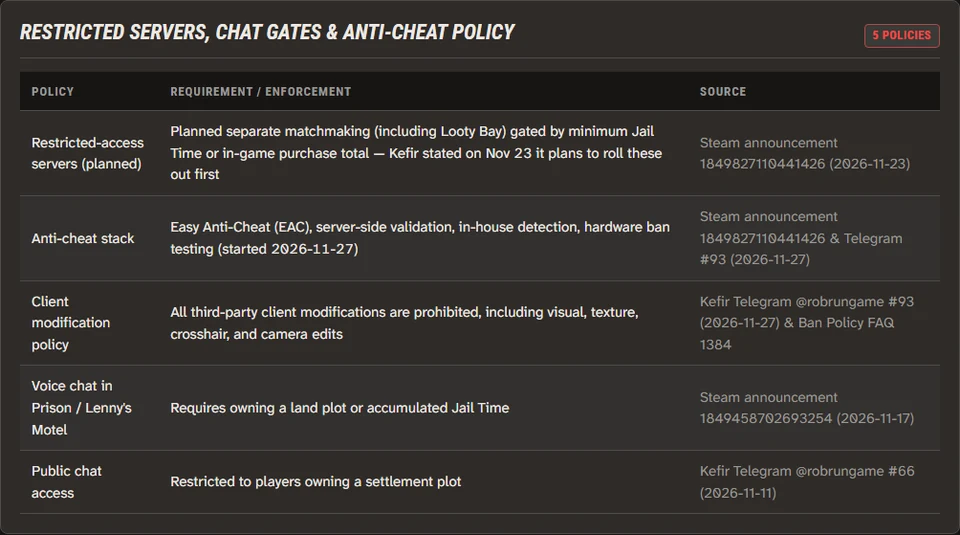
- Client protection layers Easy Anti-Cheat with server-side checks, Kefir’s internal detection tools, and hardware ban testing that began on 2026-11-27.
- Missing, damaged, or software-blocked Easy Anti-Cheat modules stop the client from entering the game and surface codes E-0501, E-0502, or E-0503.
- Startup also checks Steam authentication and Epic Online Services authorization, with failures surfacing as codes E-0401, E-0403, or E-0404.
- Third-party client modifications of any kind — from custom crosshairs and camera tweaks to texture or visual changes — are forbidden, and Kefir’s ban rules also penalize scripts, macros, unauthorized software, and anti-cheat bypass attempts.
If an anti-cheat error occurs on Windows, support guidance recommends launching exclusively via Steam, checking file integrity in Steam properties, restarting the computer, or sending a screenshot and your UID to support. You can read the full anti-cheat, server, and weekly wipe rules on the servers and wipes system page.
Controller Support and Keyboard Controls
The exported English client string table lists no controller, gamepad, or analog-stick configuration menus. Instead, the in-game Controls and Key Bindings screens are built around a mouse and keyboard:

- Mouse settings expose
General Sensitivityfor overall movement,ADS Sensitivityfor aiming, andInvert Mouse Y-Axis(added in the 2026-11-17 update) so pushing the mouse upward pitches the camera down. - Players can rebind actions through the
Press a new keyprompt, toggleHold to Aim,Hold to Crouch, andHold to Sprint, and bindQuick Click-Transfer ItemsorQuick Hover-Transfer Items. - The E-0601 error triggers when the client fails to detect basic keyboard and mouse hardware — a common issue over Remote Desktop or cloud streaming setups — and support instructs players to attach a physical keyboard and mouse before startup.
- If frame rates drop into single digits only while moving the cursor, Kefir’s troubleshooting blames an overly high mouse polling rate and advises lowering that rate in your mouse utility app.
To speed up looting once your bindings are ready, check our quick-transfer inventory controls guide.
PC System Requirements and Supported Languages
Every PC setup needs 20 GB of available disk space, an online connection, DirectX 11 graphics support, and 64-bit Windows 10 or later. On startup, the client also checks that your graphics card provides at least 3.5 GB of VRAM with DirectX 11 support.
| Tier | Processor | Memory | Graphics |
|---|---|---|---|
| Minimum | Intel i5-6600K or Ryzen 5 1600 | 12 GB | GTX 1050 Ti, RX 580, or Arc A380 |
| Recommended | Intel i5-9600K or Ryzen 5 3600 | 16 GB | RTX 2070, RX 5700 XT, or Arc B570 |
Because the minimum specification starts at 12 GB of memory, older machines with less RAM sit below Kefir’s floor. For localization, the Steam overview lists interface support in English, Russian, French, German, Spanish - Spain, and Portuguese - Brazil, and in-game settings provide selectors for text language and character voice language.
Once installed on a supported Windows machine, review our server switching and playing with friends guide to pick a regional server and squad up.